사진에 있는 내용을 일일이 영어로 묘사하기 귀찮으셨나요? 혹은 내 사진의 느낌 그대로 스타일만 바꾸고 싶으셨나요?
그렇다면 아주 잘 오셨습니다. 이번에는 복잡한 설명 없이, [ 업로드 이미지 ] 하나만으로 지브리 감성을 덧입히는 '초간편 스타일 변환' 마스터 프롬프트를 준비했습니다. 이미지가 모든 이야기를 담고 있기에, 프롬프트는 오직 '분위기'에만 집중하도록 설계했습니다.
여러분의 사진 한 장이면 충분합니다. 바로 시작해 볼까요?
🎨 Instant Style-Transfer Master Prompt
[ Uploaded Image ] Transform this visual into a breathtaking Studio Ghibli style illustration. Strictly maintain the original composition, subjects, and layout of the source image. Apply Hayao Miyazaki's signature art style: soft pastel colors, hand-painted watercolor textures, warm golden lighting, and a nostalgic, dreamy atmosphere. Enhancing the scene with a magical, cozy anime movie screenshot aesthetic.
1. 제목: 설명은 생략한다, 사진 한 장으로 완성하는 'Ghibli 스타일 프롬프트'
"프롬프트에 뭐라고 써야 하지?" 고민할 필요 없습니다. 이 프롬프트는 여러분이 업로드한 이미지를 절대적인 기준으로 삼습니다. 인물이 웃고 있든, 강아지가 뛰고 있든, AI에게 "내용은 건드리지 말고, 붓터치만 바꿔!"라고 강력하게 주문하는 순수 스타일 변환용 도구입니다.
2. 프롬프트의 특징
이 프롬프트는 사용자의 편의성을 극대화한 것이 가장 큰 특징입니다.
설명 불필요 (No Description Needed): 복잡하게 피사체를 묘사하는 문장을 싹 뺐습니다. 대신 Transform this visual과 Strictly maintain(엄격하게 유지하라)이라는 명령어를 통해, 업로드된 이미지가 곧 프롬프트의 주어가 되도록 설정했습니다.
스타일 집중 (Style Focused): 텍스트의 비중을 줄인 대신, 지브리 특유의 '파스텔 톤', '수채화 질감', '따뜻한 조명' 등 스타일 키워드를 강조하여 변환 효과를 높였습니다.
범용성 (Universal Use): 인물, 풍경, 사물 등 어떤 사진을 넣어도 프롬프트를 수정할 필요 없이 그대로 사용할 수 있습니다.
3. 사용 방법
이 프롬프트는 미드저니(Midjourney), 스테이블 디퓨전(Stable Diffusion) 등 이미지를 입력받을 수 있는 모든 AI 툴에서 유용합니다.
AI 입력창에 변환하고 싶은 이미지를 업로드(첨부) 합니다.
위의 마스터 프롬프트에서 [ **_Uploaded Image_** ] 부분은 실제 텍스트로 입력하는 것이 아닙니다. (여러분이 이미지를 올렸다는 표시입니다!)
Transform this visual... 부터 시작하는 영어 문장을 그대로 복사해서 입력창에 붙여넣습니다.
만약 미드저니를 사용하신다면, 프롬프트 끝에 --iw 2 (이미지 가중치 최대)를 붙여주시면 원본 사진과 더 비슷하게 나옵니다.
4. 프롬프트 예시 3가지(제미나이 생성 이미지)
똑같은 프롬프트지만, 어떤 [ 업로드 이미지 ] 를 넣느냐에 따라 결과는 천차만별입니다.
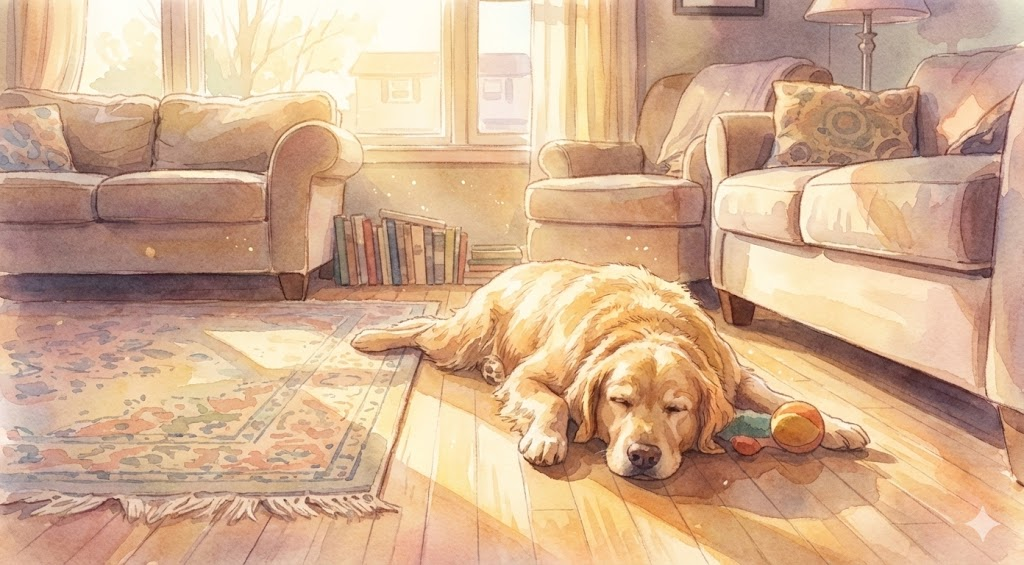
Case 1: 우리 집 강아지 사진
[ 업로드 이미지 ]: 거실 바닥에 배를 깔고 누운 리트리버
Transform this visual into a breathtaking Studio Ghibli style illustration. Strictly maintain the original composition, subjects, and layout of the source image. Apply Hayao Miyazaki's signature art style: soft pastel colors, hand-painted watercolor textures, warm golden lighting, and a nostalgic, dreamy atmosphere. Enhancing the scene with a magical, cozy anime movie screenshot aesthetic.
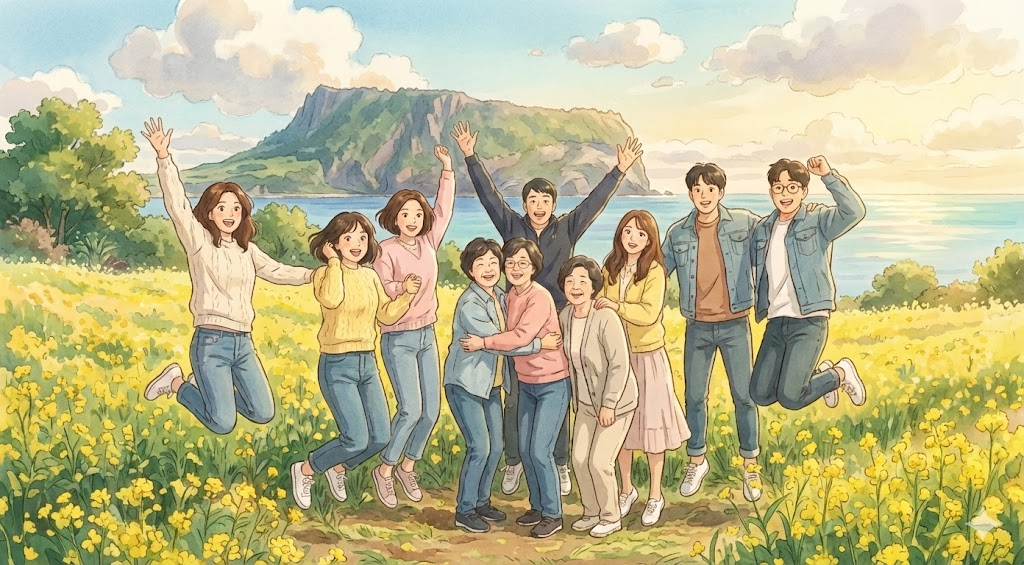
Case 2: 친구들과 찍은 여행 셀카
[ 업로드 이미지 ]: 제주도 유채꽃밭에서 찍은 단체 사진
Transform this visual into a breathtaking Studio Ghibli style illustration. Strictly maintain the original composition, subjects, and layout of the source image. Apply Hayao Miyazaki's signature art style: soft pastel colors, hand-painted watercolor textures, warm golden lighting, and a nostalgic, dreamy atmosphere. Enhancing the scene with a magical, cozy anime movie screenshot aesthetic.
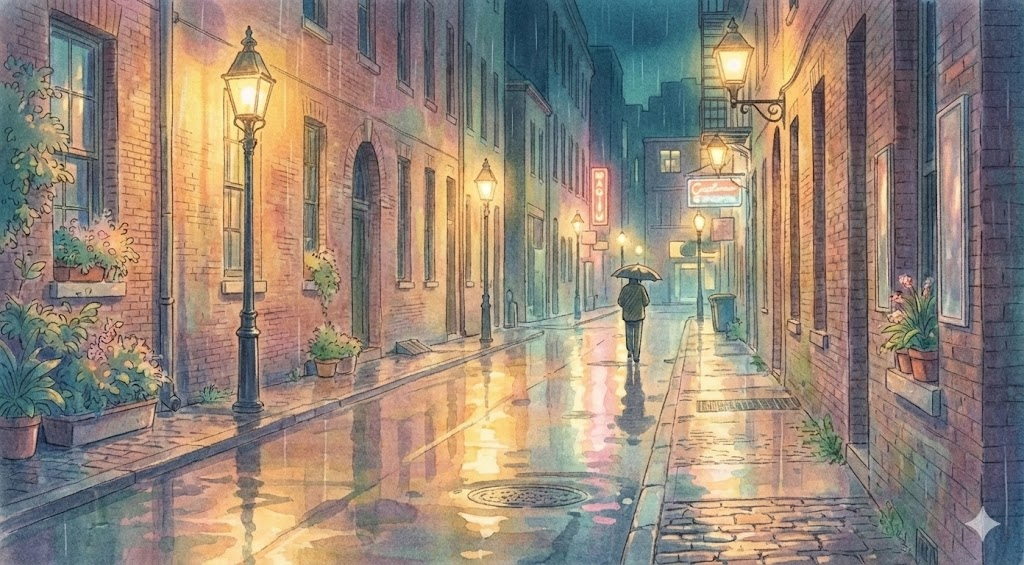
Case 3: 비 오는 날의 거리 풍경 (분위기 중심)
[ 업로드 이미지 ]: 비에 젖은 아스팔트 바닥과 가로등 불빛이 비치는 어둑한 골목길 사진
Transform this visual into a breathtaking Studio Ghibli style illustration. Strictly maintain the original composition, subjects, and layout of the source image. Apply Hayao Miyazaki's signature art style: soft pastel colors, hand-painted watercolor textures, warm golden lighting, and a nostalgic, dreamy atmosphere. Enhancing the scene with a magical, cozy anime movie screenshot aesthetic.
어떤가요? 이제 "영어로 묘사하기 어려워서" 포기했던 사진들도 마음껏 변환해 볼 수 있겠죠? 여러분의 갤러리 속에 잠들어 있는 평범한 사진들을 지금 바로 꺼내보세요!